AI Video Marketing Agentposting daily
It made this. Nobody opened an editor.
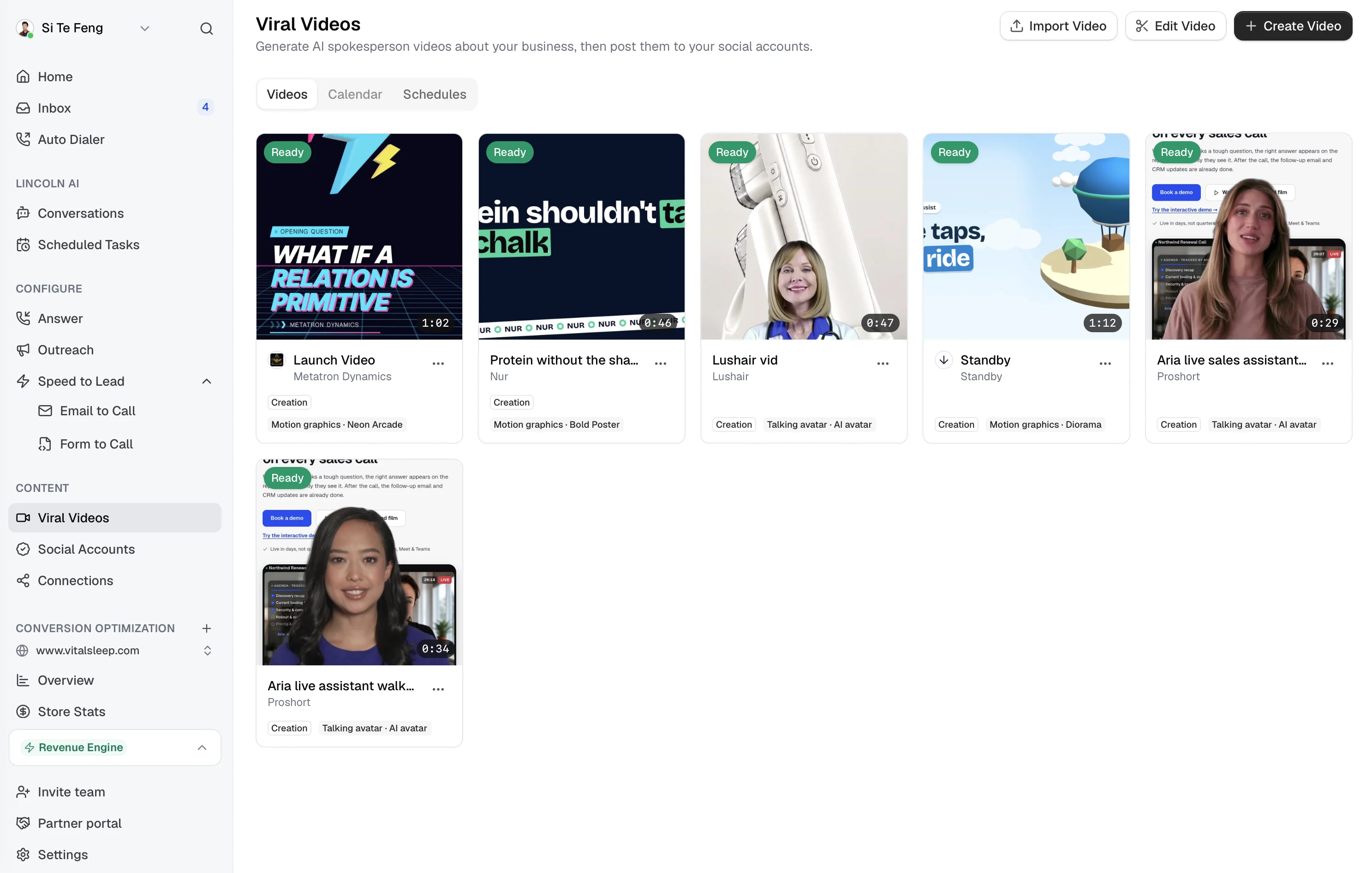
The Content Marketing Strategist researches your business, your competitors and this week's news, writes the script, and makes the video in whichever of ten templates fits. Hand it your own recordings instead and it edits them. Then it posts to six networks, on a schedule you set once.
Launch Video for Metatron Dynamics · Motion graphics, Neon Arcade · 1:02
From a website to a posted video
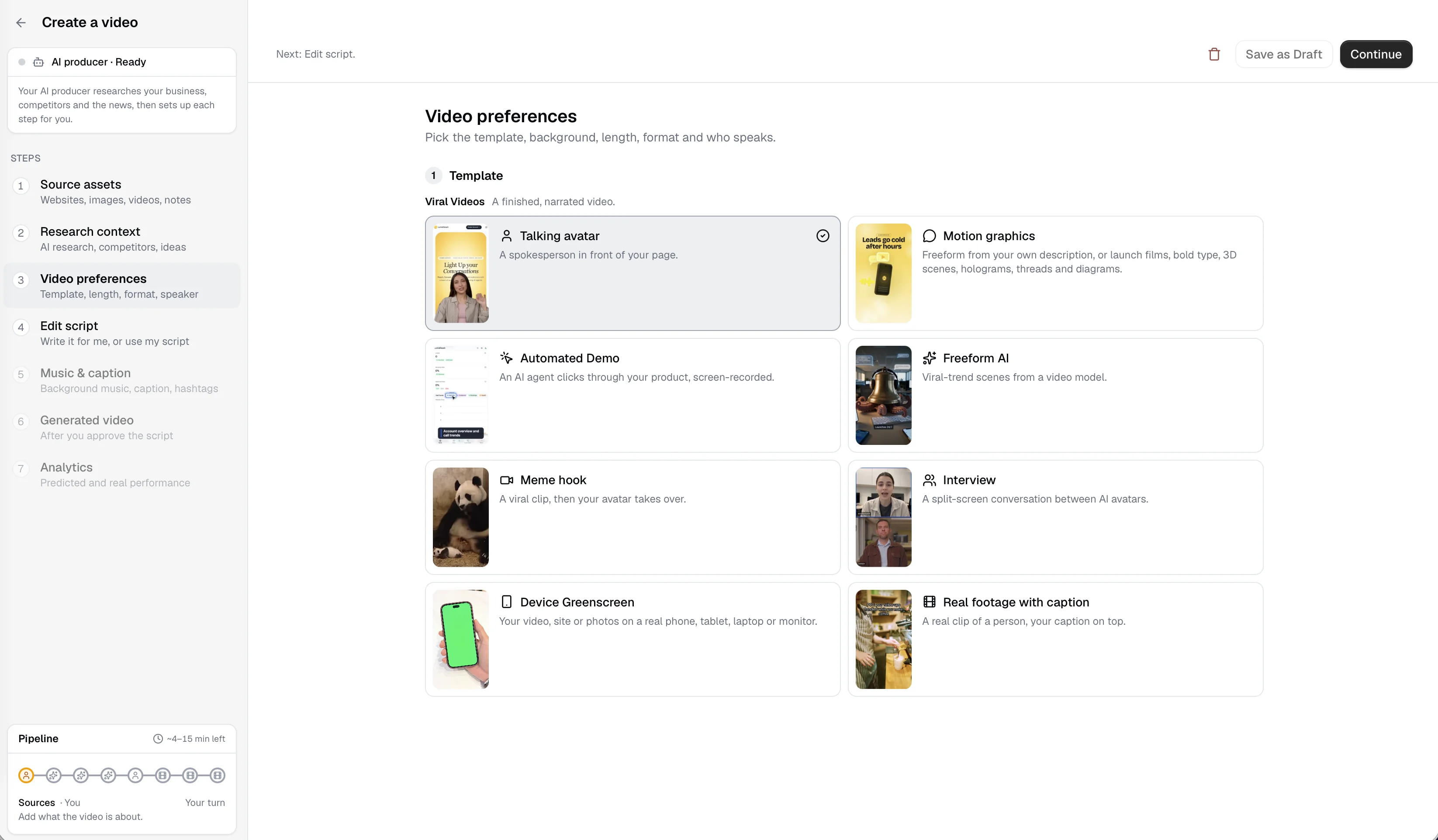
These are the steps of the Create Video workspace. An AI producer sets each one up for you; stop at any of them to change what it chose, or press Generate automatically and it runs them all.
01
Source assets
Your website, plus any images, videos, documents or notes. A login is optional and lets it see the product behind the sign-in too.
02
Research context
It maps your site, finds competitors' recent reels, reads the headlines that touch your business, and comes back with five video ideas, best first.
03
Video preferences
Template, style, length, format and who speaks, each pre-selected with the reason it was picked.
04
Edit script
The script, or the shot list for a scene template. Approve it as written, change a line, or paste in your own.
05
Music & caption
Background music, burned-in captions, the post caption and hashtags, chosen while the video renders.
06
Generated video
One social-ready MP4, vertical or wide, posted now or scheduled onto the calendar.
07
Analytics
Predicted performance before it goes out, real numbers after, and replies to comments while they still count.
One library. Three ways to fill it.
Create Video makes a video from nothing but your business. Edit Video turns recordings you already have into a finished cut. Import Video takes a video made somewhere else and gives it captions, music and a place on the posting calendar.
Everything lands in the same library, whichever way it got there, so the calendar, the schedules and the comment replies work the same for all of it.
It starts by reading your business, not a prompt box.
Most video tools wait for you to say what the video is about. This one goes and finds out. Its AI producer reads your site page by page, looks at what accounts like yours are posting, and searches the news for anything that gives you a reason to post this week.
What comes back is five ideas, each riding something it found, with the template and length that suit it. Pick one and the rest of the form fills itself in.
A map of your website
Up to five layers deep, landing page and dashboard singled out, each page with its screenshot and text. With a login it maps the product too.
Competitors' recent reels
Similar Instagram accounts and what they posted lately, so the angle is one your market is already watching.
Headlines that touch you
A new law, a local event, a shift in your category, each with the angle it opens. It reads your past videos so nothing repeats.
Your business
Audience, voice and what sets you apart, read from 23 pages.
done
Competitor analysis
Six similar accounts and their recent reels.
done
Headlines
Three stories this week with an angle for you.
done
Recommendations
Five ideas, each with a template, style and length.
pick one
Changed your sources afterwards? Research is marked out of date rather than quietly rerun.
Create Video
Nothing filmed? It makes the video.
Give it your website and nothing else. For each idea it picks one of ten templates, most with styles of their own: a spokesperson for a straight explanation, motion graphics for a launch, a recorded walkthrough when the product should speak for itself.
An account that posts the same format every day stops getting watched, so there is no house style. Every video still ends in the same place: one finished MP4, captioned and ready to post.
Your face, one of ours, or you on camera
Train an avatar from your own footage, pick a stock presenter, or choose Record yourself: it writes a script you can read, you film one take, and it cuts you out and stands you in front of your page.
An Automated Demo of your real product
An agent signs in, clicks through the route it planned from the website map, and the recording becomes the video, narrated.
AI or you
Talking avatar
A spokesperson in front of your page.
19 styles
Motion graphics
Launch films, bold type, 3D scenes, holograms, threads and diagrams.
Narrated
Automated Demo
An AI agent clicks through your product, screen-recorded.
6 trends or yours
Freeform UGC
Viral-trend scenes from a video model.
Avatar
Meme hook
A viral clip, then your avatar takes over.
2 to 4 faces
Interview
A split-screen conversation between AI avatars.
Real devices
Device Greenscreen
Your video, site or photos on a real phone, tablet, laptop or monitor.
5 formats
Real footage with caption
A real clip of a person, your caption on top.
4 formats
Viral Images
A carousel of captioned slides to swipe through.
Made with it, unedited.
Three videos made with it this week, exactly as they came out of the pipeline. The one at the top of this page is the first; here are the other two. Each was researched from the business's own site, written, narrated, animated and captioned without anybody opening an editor.
Edit Video
Already filming? It edits, too.
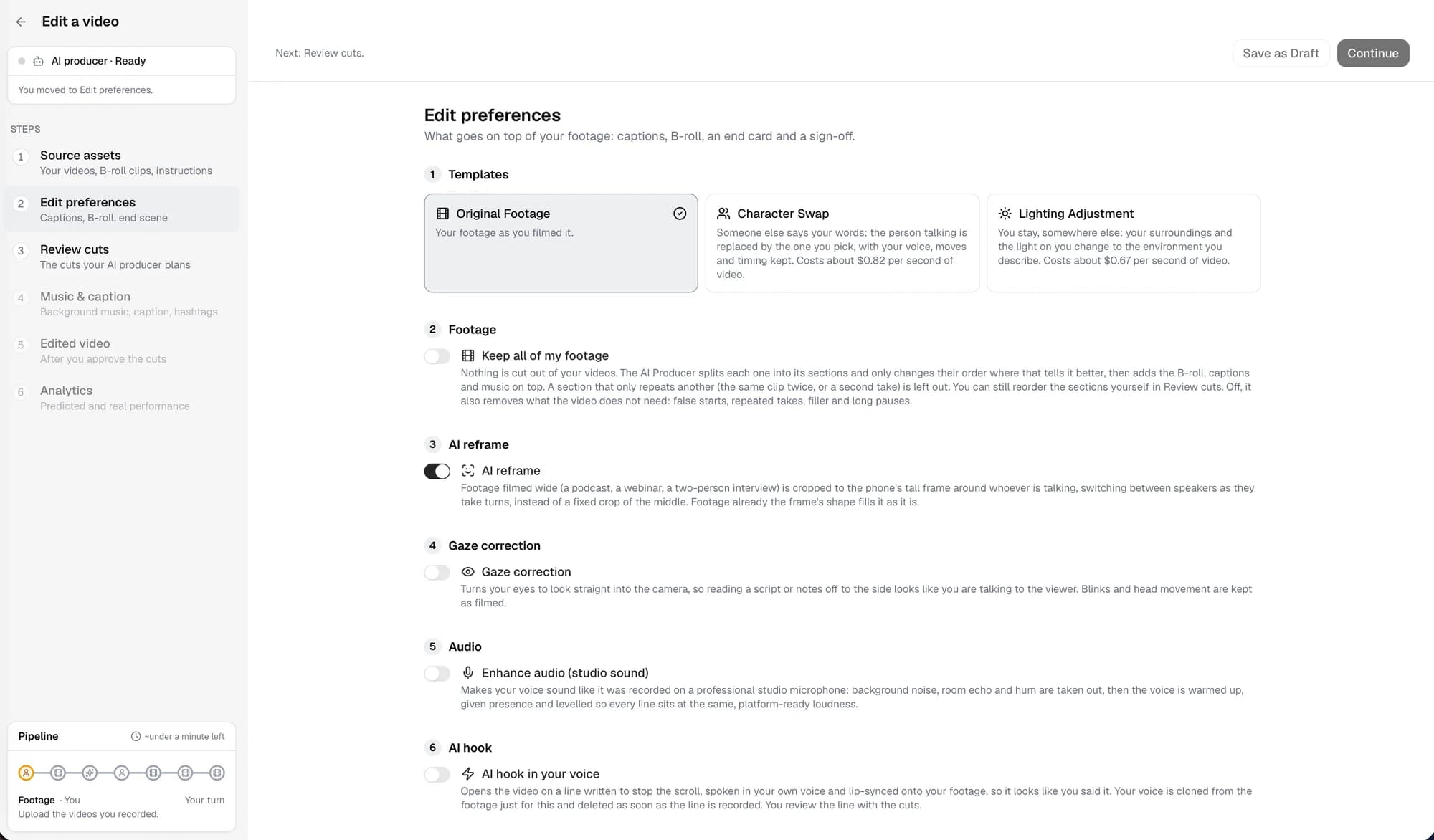
Edit Video is for the footage you already have: talking-head takes, a podcast, a walk around the shop. Upload up to twenty recordings, say how it should be edited in your own words, and it reads every take shot by shot and word by word before it cuts.
It cuts on the ends of sentences and drops the false starts, the repeated takes and the long pauses. Then it turns on what you asked for, one switch each: a new face or a new room, studio sound, eye contact, a hook in your own voice, B-roll over the right words. Or ask for clips instead: one long recording becomes up to thirty short ones, each scored for how likely it is to travel.
Template
Character Swap
Someone else says your words, with your voice, moves and timing kept.
Template
Lighting Adjustment
You stay; the place and the light on you change to the one you describe.
Up to 30 clips
AI clipping
One long recording becomes short clips, each scored for how well it will travel.
Your voice
AI voiceover hook
A line written to stop the scroll, spoken in your cloned voice and lip-synced on.
Studio sound
Audio enhancement
Noise, echo and hum taken out; the voice warmed and levelled to platform loudness.
Eye contact
Gaze correction
Your eyes turned to the lens, so reading notes looks like talking to the viewer.
6 sources
B-roll
Your clips and photos, stock footage, motion graphics or Freeform UGC, over the right words.
Vertical or wide
AI reframe
A wide shot cropped to whoever is talking, switching as speakers take turns.
Auto-picked
Face zoom
The picture pushes in on your face for the lines that matter, then back out.
Picture in picture
Video inlay
The screenshot or clip you are talking about, in a small card beside you.
Finished the way feeds want it.
Most people watch with the sound off, so captions are burned in, timed to the words actually spoken rather than the script. Pick how they move: a word at a time, a highlighted word, one big word, or a classic line. Emojis go on the moments that earn one.
Music is picked or generated to the mood, a few sound effects land on the cuts, and the post caption and hashtags are written for the video, spelled the way your business spells things.
Captions
Dynamic Highlight, emojis on.
on
Background music
Generated to the script's mood, ducked under the voice.
on
End logo scene
Your logo and the line to act on, last.
on
Caption and hashtags
Written for this video and each network.
written
Then it posts, on a schedule, and answers back.
Connect TikTok, Instagram, Facebook, X, LinkedIn and YouTube once. Post a video now, drop it on the calendar, or set a schedule: how many videos, which weekdays, what hour, which accounts.
On each posting day it researches what is current, picks the template, writes the script and caption, and tells you what is coming hours before it goes out, so you can change it or skip the day. Then it makes the video and posts it. On Instagram it stays in the comments afterwards, in your voice.
A standing order, not a to-do
The schedule is the approval. Nothing waits on you unless you want it to, and a heads-up email means nothing surprises you.
It replies while it still counts
Every new comment on an Instagram post gets a public reply written from the video and your business. Someone who only asks for a DM gets your DM instead.
It keeps score
Predicted performance before a post goes out, real views and engagement after, and its own past videos read so it never repeats one.
Videos
One a day, Monday to Friday, at 9am.
5 / week
Accounts
TikTok, Instagram, LinkedIn and YouTube.
4
Heads-up
Script, template and caption by email, three hours before.
on
Comment replies
On for every video this schedule posts.
on
You
Straight answer: $340 a month for the standard plan, no setup fee. Full breakdown is in the bio link.
What a video a day usually takes.
Compare it to an agency or an in-house hire doing the same job properly, which is the honest comparison.
Deciding what to post
Agency or in-houseA content calendar planned a month ahead, stale by week two.
With the strategistResearched each time against your site, your competitors and this week's news.
Making the video
Agency or in-houseA filming day, an editor and a two-day turnaround per video.
With the strategistMinutes per video, in any of ten templates, with no one on camera unless you want to be.
Footage you already have
Agency or in-houseA hard drive of takes nobody has time to cut.
With the strategistEdited into one video, or up to thirty scored clips, from a sentence of instructions.
Captions, music, hashtags
Agency or in-houseAnother pass, another tool, another subscription.
With the strategistPart of every video, in the style you picked.
Posting across six networks
Agency or in-houseCopy, paste, resize, reformat, forget one.
With the strategistScheduled once, posted to every connected account with its own caption.
Month four
Agency or in-houseThe account has gone quiet and nobody has said so out loud.
With the strategistStill posting on schedule, and never repeating a video it already made.
What it works with
Counted from the product as it ships today, not from a roadmap.
10
Templates
From talking avatars and motion graphics to automated product demos and carousels.
19
Motion graphics styles
Neon Arcade, Bold Poster, Diorama, Hologram, Premium 3D, and a freeform one written for each video.
30
Clips from one recording
Edit Video finds the best moments of a long recording and scores each one.
6
Networks
TikTok, Instagram, Facebook, X, LinkedIn and YouTube, each posted natively.
Questions
What does the AI Content Marketing Strategist do?
It researches your business, your competitors and the news, writes a short video, renders it, and posts it on a schedule to TikTok, Instagram, Facebook, X, LinkedIn and YouTube. It can also edit your own footage into one video or a batch of clips.
What kinds of AI videos can it make?
Talking AI spokesperson and avatar videos, motion graphics, automated product demos recorded over your own site, interviews and more, across ten templates.
Do I have to approve every video?
No. Script approval is optional: you can review each script before it renders, or let it post on its own.
How much does AI video cost?
AI video is charged at cost, $1.00 per credit, after your plan's included credits. Current plans are on the pricing page.
Make the first one with us.
Bring your website and, if you have it, some footage. We will make your first videos together on a call, connect your accounts, and set the schedule. If the account does not feel like yours, we stop.
@marcoswelds
ok but what does this actually cost